Posts

Building a Flutter Firebase Firestore CRUD App

    In this tutorial, we will walk you through the process of creating a Flutter application that performs CRUD (Create, Read, Update, Delete) operations on a list of items using Firebase Firestore. Firestore is a cloud-based NoSQL database provided by Firebase, and Flutter is a powerful open-source framework for building cross-platform mobile apps. By combining these technologies, you can create a real-time and cloud-synced list management app.  Prerequisites Before we start, ensure that you have the following prerequisites in place: Adding Dependencies First, we need to add the necessary dependencies to our Flutter project. Open your project's pubspec.yaml file and add the following dependencies: dependencies:   flutter:     sdk: flutter   firebase_core: ^latest_version   cloud_firestore: ^latest_version Replace latest_version with the actual latest versions of the firebase_core and cloud_firestore packages available on the Flutter packages webs...

Mastering Flutter: Understanding the Differences Between Static, Final, and Const

 Sure, here are short definitions for static, final, and const: Static: Refers to class-level attributes or methods. static members are shared across all instances of the class, meaning they belong to the class itself, not to any specific object. Final: Used to declare variables that can be assigned only once. A final variable must be initialized when it's declared, and its value cannot be changed later. In object-oriented programming, final can also be used to indicate that a method cannot be overridden or a class cannot be inherited. Const: Indicates that a variable's value is constant and known at compile-time. const variables are immutable, and their values are fixed for the entire runtime of the program. In languages like Dart, const also implies the variable is final class Student {   // Static variable   static String? stdBranch;   // Instance variables   String? stdName;   int? roll_num;   // Method to show student information   showStdInf...

Step-by-Step Guide to Implementing GridViews in Flutter

Image
Hello everyone, Understanding GridView in Flutter A GridView in Flutter acts like a table or grid, allowing us to neatly present items in rows and columns. It's a handy way to display various elements within a tabular layout, making it easy for users to interact with and select items. What Exactly is a GridView? Layout Organizer: Picture a grid paper divided into rows and columns. Each square of this grid can hold different things—text, pictures, icons, or anything you want to display. Two-Dimensional Display: The GridView displays items in a two-dimensional array, meaning it arranges elements both horizontally and vertically. User Interaction: Users can tap or select items within this grid layout, enabling them to interact with your app by choosing specific items of interest. Why Choose a GridView? Organized Presentation: It's perfect for organizing and showcasing numerous items in an orderly manner, like a photo gallery, product catalog, or a list of options. User-Friendly: H...

Understanding Containers in Flutter

Introduction   When you're starting with Flutter, you'll quickly come across the Container widget. It's one of the simplest yet most powerful widgets in Flutter's rich library. The Container can be compared to an empty box or canvas, which you can customize to your heart's content. In this blog post, we will delve deep into this incredibly flexible widget. What is a Container? A Container in Flutter is a basic layout and styling widget that allows you to create a rectangular visual element. The Container widget is commonly used for padding, creating a background, setting the size, and aligning its child. It is a versatile widget often used as a building block for more complex UI. Why Use a Container? Styling: You can easily change the appearance of your app by modifying the container's properties. Alignment: The Container gives you the ability to align its child widget. Size Control: It helps in specifying the exact height and width or making it relative to the ...

Flutter local notification explained for android

Today I’ll tell you that how you can set up a Local Notification Plugin on Flutter App. Using Plugin in flutter is not difficult but in the case of Flutter Local Notification. We need to set up some configuration before start using it. Step 1 : Add flutter_local_notifications dependency in your pubspec.yaml file dependencies : flutter : sdk : flutter flutter_local_notifications : ^11.0.0 Step 2 : Add VIBRATE and RECEIVE_BOOT_COMPLETED permission to your AndroidManifest.xml [ Optional ] < manifest xmlns: android ="http://schemas.android.com/apk/res/android" package ="com.example.notificationsdemo" > < uses-permission android :name ="android.permission.RECEIVE_BOOT_COMPLETED" /> < uses-permission android :name ="android.permission.WAKE_LOCK" /> < uses-permission android :name ="android.permission.SYSTEM_ALERT_WINDOW" /> < uses-permission android :name ="android.permission.VIBRATE...

Build and release an Android app

Image
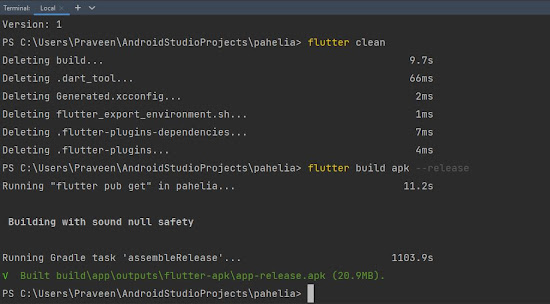
  When you’re ready to prepare a  release  version of your app, for example, to  publish to the Google Play Store , this page can help. Before publishing, you might want to put some finishing touches on your app. This page covers the following topics: Create an upload keystore Step 1 Go to  in android studio then Following the  Android Studio key generation steps Running the following at the command line: On Mac/Linux, use the following command:    keytool -genkey -v -keystore ~/upload-keystore.jks -keyalg RSA -keysize 2048 -validity 10000 -alias upload             On Windows, use the following command:                     keytool -genkey -v -keystore c:\Users\Praveen\key.jks -storetype JKS -keyalg RSA -keysize 2048 -validity 10000 -alias key      -----type this command in terminal  Like this Ex----> PS C:\Users\Praveen\AndroidStud...

Privacy Policy

Privacy Policy Effective Date:   TutBot (“we,” “us,” or “our”) values your privacy. This Privacy Policy explains how we collect, use, and protect your personal information when you use our app, TutBot - Online Courses . Information We Collect Personal Information: When you register or use our services, we may collect your name, email address, phone number, and payment information (if applicable). Usage Data: We collect information on how you use the app, including device information, IP address, operating system, and app activity, to improve your experience. Log Data: In case of app errors, we collect log data like device details and usage times to troubleshoot issues. How We Use Your Information We use your information to: Provide and maintain our services Process your registration and payments Communicate with you, including customer support Analyze app usage to improve features and performance Comply with legal obligations Data Sharing and Disclosur...